So today I almost finished my bunkers, and they are starting to look very cool, I just have a couple of errors to correct, and then it's on to the next part of my Space Invaders game, I have still to decide as to whether I'm doing the highscore system or if I'm going to do the flying saucer, but that's a bridge I'll cross when I get to it.
Other then that I really don't have much to report, my uncle has gone to Denmark, so I'll be doing my work alone for a while, or not really, cause I'll be able to email my uncle and he can help me that way!
Anyways I'm out.
Rasmus Iversen
Wednesday, 6 April 2011

Monday, 4 April 2011
It's been a while!
Alright, here the last couple of weeks, I've not been writing anything, basically I've had doubts about me wanting to be a programmer or not, and I've come to the decision, that I'm gonna give it another try, as my uncle told me, I need to actually be able to finish something, which is something I've had problems with my whole life, started something then stopped again, school then another school and even more school, so by finishing this, I might have an easier time finishing my upcoming school.
I currently still working on my bunkers for Space Invaders, and after 2 weeks, I've managed to fix a very annoying problem, which turned out to be the simplest problem ever, but it has been fixed, and I now move onto doing bunker detection, which should be finished by tomorrow, and then I need to find out what to do afterwards, but I think I'll have my hands full doing the art for my bunker pieces, and then after that making the code, to make my pictures change so that the bunker look damaged at the place the bunker piece gets hit.
Today haven't been the day I've had the most focus, and I've been taking waaaaaaay too many breaks, and just been staring at the screen without actually doing anything.
It is also known as procrastination, and I seem to be doing it constantly.
Anyways until next time take care.
Rasmus Iversen
I currently still working on my bunkers for Space Invaders, and after 2 weeks, I've managed to fix a very annoying problem, which turned out to be the simplest problem ever, but it has been fixed, and I now move onto doing bunker detection, which should be finished by tomorrow, and then I need to find out what to do afterwards, but I think I'll have my hands full doing the art for my bunker pieces, and then after that making the code, to make my pictures change so that the bunker look damaged at the place the bunker piece gets hit.
Today haven't been the day I've had the most focus, and I've been taking waaaaaaay too many breaks, and just been staring at the screen without actually doing anything.
It is also known as procrastination, and I seem to be doing it constantly.
Anyways until next time take care.
Rasmus Iversen
Monday, 21 March 2011
It's been a week!
So it's been a week since I last addressed the readers of this blog, reason for this, is that I've been sick the last week, which wasn't very cool, had some flu-like symptoms and stomach pain, but yea I'm now over that and a new week starts.
I've resumed work on my Space Invaders game, and I'm getting closer and closer to the end, that is, if not my uncle find more things to add to my program, I've started work on the bunkers and they are being build slowly, I'm having a hard time putting them in the correct position using code only.
Also I added collision with the bullets, meaning that now you can shoot down the enemies bullets, so you have a better chance of avoiding the aliens bullets.
I'm hopping to finish the work on the bunker tomorrow, and then I need to make some explosions and some sound effects, and I think that's that for now, of course I need to optimize the graphics, meaning so that the collision is 100% accurate, and I need to change some things with the alien bullets, so they actually looks like they are twisting, so that they aren't just a still picture moving around.
The coming week I'm going to be working alone in the house, since my uncle is going to Syria to sell a program, so that will be a challenge in it self, one thing will be not having his help, another challenge will be to stay focused on my work.
-Rasmus Iversen
I've resumed work on my Space Invaders game, and I'm getting closer and closer to the end, that is, if not my uncle find more things to add to my program, I've started work on the bunkers and they are being build slowly, I'm having a hard time putting them in the correct position using code only.
Also I added collision with the bullets, meaning that now you can shoot down the enemies bullets, so you have a better chance of avoiding the aliens bullets.
I'm hopping to finish the work on the bunker tomorrow, and then I need to make some explosions and some sound effects, and I think that's that for now, of course I need to optimize the graphics, meaning so that the collision is 100% accurate, and I need to change some things with the alien bullets, so they actually looks like they are twisting, so that they aren't just a still picture moving around.
The coming week I'm going to be working alone in the house, since my uncle is going to Syria to sell a program, so that will be a challenge in it self, one thing will be not having his help, another challenge will be to stay focused on my work.
-Rasmus Iversen
Monday, 14 March 2011
My work continues!
I'm back from almost a weeks vacation, and now my work continues on Space Invaders, which seems to be a lot bigger a challenge then I first expected, but it's getting there, now I have loads of different monsters, the monsters can now shoot, and you now have lives, there's a new game function there's an exit game function and next I'm planning on making bunkers and explosions when you and the monsters die, I still have quite a lot of work a head of me, but I'm hoping that tomorrow, I'll be a bit more into the programming, then I was today, I also have to make a highscore system for my game, I hope that wont take too long, but when it's done, it's going to be even more fun to play Space Invaders!
In my vacation, I've been relaxing as much as possible, going to the movies, relaxing on the couch, playing my new Pokémon game(s), (yes I do play Pokémon), and we (my cousin and I) have been playing a lot of Smackdown Vs. Raw 2011, which is a great game.
Well that is all I had to report today.
Best Regards
Rasmus Iversen
In my vacation, I've been relaxing as much as possible, going to the movies, relaxing on the couch, playing my new Pokémon game(s), (yes I do play Pokémon), and we (my cousin and I) have been playing a lot of Smackdown Vs. Raw 2011, which is a great game.
Well that is all I had to report today.
Best Regards
Rasmus Iversen
Friday, 4 March 2011
Space Invaders the 3rd.
My work on Space invaders continues, most of my day went with making the user able to shoot, and making the shot actually hit things, and the monster that gets hit gets terminated, and then when that was finally finished and I started working on another problem, my uncle thought it funny to make me write all the code for monster movement all over again, but this time the goal was not for the monsters to move, but for the monsters to move with a significantly lower amount of timer objects, but also with a lot less code.
And now most of that has been accomplished, now there are still a couple of bugs to fix, and a score system to add, but other then that, my game is starting to look pretty cool, I'll add some pictures in tomorrows post, and also of course, I'll make a total explanation of the whole game once it is finished.
I'll end todays post with a quote of one of the most important characters in history, Martin Luther King Jr.
“I have a dream that my four little children will one day live in a nation where they will not be judged by the color of their skin, but by the content of their character.”'
-Rasmus Iversen
And now most of that has been accomplished, now there are still a couple of bugs to fix, and a score system to add, but other then that, my game is starting to look pretty cool, I'll add some pictures in tomorrows post, and also of course, I'll make a total explanation of the whole game once it is finished.
I'll end todays post with a quote of one of the most important characters in history, Martin Luther King Jr.
“I have a dream that my four little children will one day live in a nation where they will not be judged by the color of their skin, but by the content of their character.”'
-Rasmus Iversen
Thursday, 3 March 2011
Space Invaders! 2.0
I've today been continuing with writing my program Space Invaders, unfortunately due to windows update decided to restart my computer, and all my work was lost, I had to rewrite it, but as a wise man once told me, it's always better the second time, now I rewrote it, and now the movement is more fluid, and everything seems to work as it's supposed to, a minor setback, and I must admit, I was a bit angry once I was finished, and I then decided to go read "A short history of nearly everything" by Bill Bryson.
An excellent book, that I think everybody should read, it tells you a lot about the universe we live in, and the writer has done a phenomenal job in writing this book, so that it all feels like one long story, that contains scientific information that everybody should know about, example did you know that the inner core of the earth actually is solid? And not liquid as you might have thought, only the so called "Outer Core" is liquid, and that Yellowstone National park is the world's largest active super volcano, and that it in average erupts every 600000 years, and that it's been 750000 years since it last erupted? So it could erupt any moment, and potentially cause a complete genocide of the entire human race, and other animals.
This book doesn't only contain information about geography, but also contains the stories of Albert Einstein, Edward Halley and others.
I really recommend reading this book, personally I'm only 40% into the book, and I've learned a whole lot.

-Rasmus Iversen
An excellent book, that I think everybody should read, it tells you a lot about the universe we live in, and the writer has done a phenomenal job in writing this book, so that it all feels like one long story, that contains scientific information that everybody should know about, example did you know that the inner core of the earth actually is solid? And not liquid as you might have thought, only the so called "Outer Core" is liquid, and that Yellowstone National park is the world's largest active super volcano, and that it in average erupts every 600000 years, and that it's been 750000 years since it last erupted? So it could erupt any moment, and potentially cause a complete genocide of the entire human race, and other animals.
This book doesn't only contain information about geography, but also contains the stories of Albert Einstein, Edward Halley and others.
I really recommend reading this book, personally I'm only 40% into the book, and I've learned a whole lot.

-Rasmus Iversen
Wednesday, 2 March 2011
Space Invaders!
So right now, I'm in the middle of writing a Space Invaders program, it's giving me a lot of trouble with the movement of the monster rows.
Here's what it looks like at the moment.

So far so good, at the moment I have the movement of the user avatar, and half of the monster movement figured out, unfortunately when the monsters moves back and forth once they go completely berserk, and move around all across the screen, this is a mistake I have to address tomorrow, one thing is for sure, it's gonna take some time to correct, but another thing is also certain, it's going to get fixed.
Next I have to make the bullets, or lasers, haven't quite decided what it's going to look like yet, but it will all come in due time, and then afterwards collision with the units, so I have quite a lot of work ahead before this game of games is finished!
-Rasmus Iversen
Here's what it looks like at the moment.

So far so good, at the moment I have the movement of the user avatar, and half of the monster movement figured out, unfortunately when the monsters moves back and forth once they go completely berserk, and move around all across the screen, this is a mistake I have to address tomorrow, one thing is for sure, it's gonna take some time to correct, but another thing is also certain, it's going to get fixed.
Next I have to make the bullets, or lasers, haven't quite decided what it's going to look like yet, but it will all come in due time, and then afterwards collision with the units, so I have quite a lot of work ahead before this game of games is finished!
-Rasmus Iversen
Monday, 28 February 2011
I made a mp3 player.
Right, so over the last couple of days, I've been making an mp3 player, let's start out with an image.
I had great fun writing this program, it really got me hooked at times, and I'd not notice as the time passed by, I guess that what music can do to you.

It's a splash screen that has some information, like the name of the program, and who it's been made by.
Making a splash screen is very simple, and to make the program know that you have a splash screen, all you have to do is go to the application settings and you can apply your splash screen.
I made this splash screen in Photoshop, didn't take me very long, and i've a novice with photoshop, so everyone should be able to do it.

Next, there is the main screen, this is where you play the music from, you can import songs to your playlist, turn the volume up and down, save and load your playlist. Also you have two buttons in the top right corner, one button (x) will close down the program and show the end splash (will be shown later), the other button (_) will minimize the application to the system tray, and wont fill up your bar at the bottom.
I've made most of this Mp3 player with the WMP object already implemented into the .Net framework, and then I created all the art with Photoshop, I had to get a lot of help from people who made other Mp3 players, especially This Link helped me quite a lot, I had a lot of problems with 2 things, one being the load/save playlist function, and the other being minimize to the tray, the rest of it actually just a walk in the park, all you need to know is the commands to operate the WMP objects, and you are set.
I made it so that the only file extension that can be used is Mp3, I could easily make more extensions use able, but I chose to only make it Mp3, cause if I added the extensions it wouldn't really be a Mp3 Player, but a Music player!

The Now Playing screen will be displayed whenever a track is being played, here you can see the song name and artist, and you can use the search bar to find your favorite moments of your songs, so you wont have to listen all the boring parts.
The now playing screen, consists of 4 things, a background, 2 labels and a track bar, 1 labels to display the song name and 1 to display the artist.
And as you might have guessed, the track bar lets you change to where ever you want in the song.

And here is the end splash screen, which shows when you close the program, thanking you for using the program. Again, this was made with photoshop.
To make the splash show at the end, all I had to do was make it appear, and then with a timer, shut down again, in this case 3500 milliseconds or 3,5 seconds later.
Thanks for reading.
Rasmus Iversen
I had great fun writing this program, it really got me hooked at times, and I'd not notice as the time passed by, I guess that what music can do to you.

It's a splash screen that has some information, like the name of the program, and who it's been made by.
Making a splash screen is very simple, and to make the program know that you have a splash screen, all you have to do is go to the application settings and you can apply your splash screen.
I made this splash screen in Photoshop, didn't take me very long, and i've a novice with photoshop, so everyone should be able to do it.

Next, there is the main screen, this is where you play the music from, you can import songs to your playlist, turn the volume up and down, save and load your playlist. Also you have two buttons in the top right corner, one button (x) will close down the program and show the end splash (will be shown later), the other button (_) will minimize the application to the system tray, and wont fill up your bar at the bottom.
I've made most of this Mp3 player with the WMP object already implemented into the .Net framework, and then I created all the art with Photoshop, I had to get a lot of help from people who made other Mp3 players, especially This Link helped me quite a lot, I had a lot of problems with 2 things, one being the load/save playlist function, and the other being minimize to the tray, the rest of it actually just a walk in the park, all you need to know is the commands to operate the WMP objects, and you are set.
I made it so that the only file extension that can be used is Mp3, I could easily make more extensions use able, but I chose to only make it Mp3, cause if I added the extensions it wouldn't really be a Mp3 Player, but a Music player!

The Now Playing screen will be displayed whenever a track is being played, here you can see the song name and artist, and you can use the search bar to find your favorite moments of your songs, so you wont have to listen all the boring parts.
The now playing screen, consists of 4 things, a background, 2 labels and a track bar, 1 labels to display the song name and 1 to display the artist.
And as you might have guessed, the track bar lets you change to where ever you want in the song.

And here is the end splash screen, which shows when you close the program, thanking you for using the program. Again, this was made with photoshop.
To make the splash show at the end, all I had to do was make it appear, and then with a timer, shut down again, in this case 3500 milliseconds or 3,5 seconds later.
Thanks for reading.
Rasmus Iversen
Tuesday, 15 February 2011
How to make the computer talk
Making a computer talk is actually a simple matter, you start of by going to Project > Add Reference then you click the System.Speech and add it.
Now you have to go to your forms code, and ABOVE Public Class Form1 you write Imports System.Speech
Under Public Class Form1 you write:
Public Synth as New.SpeechSynthesizer
Now you create a button, and under it you write:
synth.speak("Hello world")
and that's it! If you run your program and click the button, you will hear your program say "hello world".
-Rasmus Iversen
Now you have to go to your forms code, and ABOVE Public Class Form1 you write Imports System.Speech
Under Public Class Form1 you write:
Public Synth as New.SpeechSynthesizer
Now you create a button, and under it you write:
synth.speak("Hello world")
and that's it! If you run your program and click the button, you will hear your program say "hello world".
-Rasmus Iversen
Monday, 14 February 2011
My day.
Today's been pretty straight forward, I've been doing a little programming, adding a new feature to my first game, I've been writing a couple of posts in my blog, and then I moved my pc around the office.
To my first game, i added it so, that you can choose between which numbers you want the random number to be, so the standard is 1-100, but if you want, you can now set it to 1-100000 or 25000-1248943 if you want.
Well as for the blog posts, you can read them yourself, bear in mind, that i am not completely finished with The Turing Test, and i will be finishing it tomorrow.
Moving my "desk" around the office, i turned my desk, so that my uncle can see my screen while i am working, makes it easier for him to make sure i'm not doing any funny business.
But that's about all i have for you today.
-Rasmus Iversen
The Turing Test
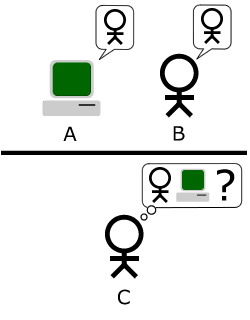
The Turing test is a test, that tests a computers intelligence, it is done by having 1 person and a computer in one room, and and 1 person in another, the person who's alone is going to engage in a normal conversation between the 3 parts, and is going to try and determine who's the computer and who's the real person, it is said, that if he can't determine who is who, then the computer has passed.
Here's a picture that might explain it better.

Source
-Rasmus Iversen
Here's a picture that might explain it better.
Source
-Rasmus Iversen
Presentation of my Chatbot
Lately I've been working on a very simple chatbot, and so far it's going pretty good, I've "taught" it to do math, tell time, Google search and more.
Here's a picture!

Making the chatbot itself is not so hard, here's some of the code:
Private Sub TellTime()
ListBox1.Items.Add(("Chatbot: the time is: ") & System.DateTime.Now.ToString("HH:mm:ss"))
synth.Speak(("the time is: ") & System.DateTime.Now.ToString("HH:mm:ss"))
End Sub
I'm gonna just take a line or two at a time.
question = txtInput.Text.To.Lower.Trim
This line takes the text in txtInput and puts it in the variable question in lower case and with no double spaces.
Listbox1.Items.Add("User: " & question)
Writes the users question in the Listbox1.

Here's a picture!

Making the chatbot itself is not so hard, here's some of the code:
question = txtInput.Text.ToLower.TrimListBox1.Items.Add("User: " & question)
If question.IndexOf("what's the time") > -1 ThenTellTime()End If
Private Sub TellTime()
ListBox1.Items.Add(("Chatbot: the time is: ") & System.DateTime.Now.ToString("HH:mm:ss"))
synth.Speak(("the time is: ") & System.DateTime.Now.ToString("HH:mm:ss"))
End Sub
I'm gonna just take a line or two at a time.
question = txtInput.Text.To.Lower.Trim
This line takes the text in txtInput and puts it in the variable question in lower case and with no double spaces.
Listbox1.Items.Add("User: " & question)
Writes the users question in the Listbox1.
If question.IndexOf("what's the time") > -1 Then
TellTime()
End If
Checks if the variable question contains the sentence "what's the time", and if it does, then it opens the Sub routine TellTime()
ListBox1.Items.Add(("Chatbot: the time is: ") & System.DateTime.Now.ToString("HH:mm:ss"))
Adds the Chatbots answer to the listbox, System.DateTime.Now.ToString("HH:mm:ss") is the time to show the time.
synth.Speak(("the time is: ") & System.DateTime.Now.ToString("HH:mm:ss"))
This makes the Chatbot actually speak, however this requires you to add a reference, i'll make a post about it later.
Here's another picture!

This picture shows how the Google search works, if you want to search as I'm feeling lucky all you have to do, is instead of writing "tell me all about" then just type "tell me about", and it'll do a i'm feeling lucky search.
That's all i have for you this time.
-Rasmus Iversen
Friday, 11 February 2011
The simple AI of my game!
The AI in my game is very simple, basically what it does, is that it adds two variables (Imin and Imax) together and then divides them by 2, i'm going to write the algorithm and the code, and then explain as best as i can.
Algorithm:
(imin + imax) / 2 = guess
Code:
If intImax = 0 Then
intImax = 100
End If
If intImin = 0 Then
intImin = 1
End If
If intNumberOfGuesses = 0 Then
AIguess = 50
Else
AIguess = Int((intImin + intImax) / 2)
End If
Okay i'll take one bit at a time.
Algorithm:
(imin + imax) / 2 = guess
Code:
If intImax = 0 Then
intImax = 100
End If
If intImin = 0 Then
intImin = 1
End If
If intNumberOfGuesses = 0 Then
AIguess = 50
Else
AIguess = Int((intImin + intImax) / 2)
End If
Okay i'll take one bit at a time.
If intImax = 0 Then
intImax = 100
End If
what happens here is that if intImax is zero it'll be set to 100
If intImin = 0 Then
intImin = 1
End If
and here the same happens with Imin but it's set to 1.
If intNumberOfGuesses = 0 Then
AIguess = 50
these 2 lines of code tells the program that if it's the first guess of the game, then the A.I should guess 50.
Else
AIguess = Int((intImin + intImax) / 2)
End If
and here if it isn't the first guess of the game, the program runs the algorithm.
But that doesn't work, if it keeps running this algorithm, it'll keep guessing, so we need to keep changing Imin and Imax, here's the code that does this for us.
Select Case result
Case "Lower"
If Guess < gintImax Or gintImax = 0 Then
gintImax = Guess
End If
Case "Higher"
If Guess > gintImin Then
gintImin = Guess
End If
So here again i'll take one bit of code at a time.
Select Case result
Case "Lower"
If Guess < gintImax Or gintImax = 0 Then
gintImax = Guess
End If
Here if a guess is lower then the random number, it says that if the guess is lower then Imax or if Imax is 0, then set the Guess to Imax.
Case "Higher"
If Guess > gintImin Then
gintImin = Guess
End If
Here it's pretty much the same, but with a few alterations, this code is activated if the guess is higher then the random number, what it does is, if the guess is larger then Imin, then set Imin to the guess.
And it's that simple.
-Rasmus Iversen
My first game - Presentation.
So i thought i'd give a small presentation of the first game i made, it's called Guess a number.
I guess i'll start off by showing the Main Menu! Well here it is!

Very simple, it's here that you can choose what you want to do.
Next, the singleplayer screen!


As you can see, it looks almost exactly like the singleplayer, but as you can see in the guess list, there's also a computer player!
Next the Highscore list!

Very simple, it shows the names and scores of the top players! Also has a reset button, which obviously, resets the highscores!
Last but not least, there's the credits screen!

Basically a little info about the creators.
And that's that!
-Rasmus Iversen
I guess i'll start off by showing the Main Menu! Well here it is!

Very simple, it's here that you can choose what you want to do.
Next, the singleplayer screen!
Just a quick note on what's on it, there's a button called New Game, an OK button, and also a Main Menu button, they all kind of explain themselves, but just for the fun of it here's a description.
New Game button:
Starts over a new game, and resets the Guesses and Guess count!
OK button:
Submits your guess!
Main Menu button:
Returns you to the Main Menu!
Next, the Multiplayer screen!
The first screen you see, when you press the multiplayer button is the "who starts" screen, here you choose who starts, you are the A.I.
As you can see, it looks almost exactly like the singleplayer, but as you can see in the guess list, there's also a computer player!
Next the Highscore list!
Very simple, it shows the names and scores of the top players! Also has a reset button, which obviously, resets the highscores!
Last but not least, there's the credits screen!
Basically a little info about the creators.
And that's that!
-Rasmus Iversen
Wednesday, 9 February 2011
The For Next loop
I'll start off with an example:
Dim answer As Integer
Dim startNumber As Integer
Dim startNumber As Integer
answer = 0
For startNumber = 1 To 4
answer = answer + startNumber
Next startNumber
For startNumber = 1 To 4
answer = answer + startNumber
Next startNumber
MsgBox(answer)
What this will do is add the numbers 1 to 4, without having to write 1+2+3+4, i mean those few numbers aren't gonna take long to write down, but what about 100 numbers?
It's basicly saying answer(0) plus startnumber(1) and making the result answer(1), so next loop is answer(1) plus startnumber(2) = answer(3) and so forth! :D
Next
For intCount As Integer = 4 To 62 Step 7
listbox.items.add(intCount)
Next
Now what does the step 7 do?
First we see what the loop does without the step 7.
It takes the numbers from 4 to 62 and lists them in the listbox,
now with the step 7, it only takes every seventh number and adds
to the listbox, so instead of going 4, 5, 6 and so forth it goes,
4, 11, 18 and so forth.
Next
For intCount As Integer = 4 To 62 Step 7
listbox.items.add(intCount)
Next
Now what does the step 7 do?
First we see what the loop does without the step 7.
It takes the numbers from 4 to 62 and lists them in the listbox,
now with the step 7, it only takes every seventh number and adds
to the listbox, so instead of going 4, 5, 6 and so forth it goes,
4, 11, 18 and so forth.
For intCount As Integer = 4 To 62 Step 7
listbox.items.add(intCount)
if intcount = 18 then
exit for
end if
Next
Now as you can see, i added an If statement, and what i told it do,
is if intcount is 18 then it must run the command "Exit For",
which very simply, exits the loop and stops at 18.
is if intcount is 18 then it must run the command "Exit For",
which very simply, exits the loop and stops at 18.
-Rasmus Iversen
The IF, ELSEIF, ELSE statements
The If statement is a way of saying If this is activated, then do this, and if it isn't like that then do this so like this.
If randomnumber = 2 then
MsgBox("The random number = 2")
ElseIf randomnumber = 3 then
MsgBox("The Random number = 3")
Else
MsgBox("the randomnumber is neither 2 or 3")
End If
So basicly what i made the program do is tell me if the random number is 2, 3 or none of them.
Very simple, but they can get very complicated, you can also call other subs or functions from the If statements
exampel:
If textbox1.text = "Hello World" then
HelloWorld()
Elseif
textbox1.text = "Goodbye World" then
GoodbyeWorld()
End If
So yea with If statements, there are a lot possibilities!
-Rasmus Iversen
If randomnumber = 2 then
MsgBox("The random number = 2")
ElseIf randomnumber = 3 then
MsgBox("The Random number = 3")
Else
MsgBox("the randomnumber is neither 2 or 3")
End If
So basicly what i made the program do is tell me if the random number is 2, 3 or none of them.
Very simple, but they can get very complicated, you can also call other subs or functions from the If statements
exampel:
If textbox1.text = "Hello World" then
HelloWorld()
Elseif
textbox1.text = "Goodbye World" then
GoodbyeWorld()
End If
So yea with If statements, there are a lot possibilities!
-Rasmus Iversen
Why am I here?
Why did i travel the 3500 km from Denmark to Portugal? And why am i not in school?
I guess i'll tell you a bit of my lifes story!
I've for 2 years now, been too lazy to go school, and then this christmas i wanted to go on vacation here in portugal, and i made my mother call my uncle, and after the conversation my mom came and told me "you are not comming home from portugal", and i was like "what?! o0", and so thereafter i moved here, and it's that simple, and now i am "Studying" programming, and it's all going fairly well!
-Rasmus Iversen
I guess i'll tell you a bit of my lifes story!
I've for 2 years now, been too lazy to go school, and then this christmas i wanted to go on vacation here in portugal, and i made my mother call my uncle, and after the conversation my mom came and told me "you are not comming home from portugal", and i was like "what?! o0", and so thereafter i moved here, and it's that simple, and now i am "Studying" programming, and it's all going fairly well!
-Rasmus Iversen
Functions, what’s the difference?
So, what's the difference between a function, and a sub routine?
The difference between a sub and a function is this: Funtions return a value, Subs don't.
Substring() is a Function, because you want some sort of answer back, and an answer that you can then use elsewhere. You assign the answer to the Substring() function to a variable.
A Sub is some code or job that you want VB to get on with and execute. An example is closing a form down and unloading it with Me.Close(). You don't need to return a value, here; you just want VB to close your form down.
-Rasmus Iversen
The difference between a sub and a function is this: Funtions return a value, Subs don't.
Substring() is a Function, because you want some sort of answer back, and an answer that you can then use elsewhere. You assign the answer to the Substring() function to a variable.
A Sub is some code or job that you want VB to get on with and execute. An example is closing a form down and unloading it with Me.Close(). You don't need to return a value, here; you just want VB to close your form down.
-Rasmus Iversen
Sub Routines
What is a sub routine?
A sub routine is where you write your code, here's an example on how to write a sub routine, and then how you call it.
Private sub HelloWorld()
MsgBox("Hello World")
End Sub
And here's how you would call it.
Private Sub Button1_Click(ByVal sender As System. _
Object, ByVal e As System.EventArgs) Handles Button1.Click
Call HelloWorld()
End Sub
It's very simple, sub routines are very nifty, writing our code in there makes it a lot easier to see the difference in the code, instead of us having to write all our code under the individual buttons.
-Rasmus Iversen
A sub routine is where you write your code, here's an example on how to write a sub routine, and then how you call it.
Private sub HelloWorld()
MsgBox("Hello World")
End Sub
And here's how you would call it.
Private Sub Button1_Click(ByVal sender As System. _
Object, ByVal e As System.EventArgs) Handles Button1.Click
Call HelloWorld()
End Sub
It's very simple, sub routines are very nifty, writing our code in there makes it a lot easier to see the difference in the code, instead of us having to write all our code under the individual buttons.
-Rasmus Iversen
Visual Basic
Visual Basic, is a programming language which operates within the .NET framework, it's supposed to be a very good language for beginner programmers, while it still has a lot of depth. Well here's a cut from wikipedia:
Visual Basic (VB) is the third-generation event-driven programming language and integrated development environment (IDE) from Microsoft for its COM programming model. Visual Basic is relatively easy to learn and use.
Visual Basic was derived from BASIC and enables the rapid application development (RAD) of graphical user interface (GUI) applications, access to databases using Data Access Objects, Remote Data Objects, or ActiveX Data Objects, and creation of ActiveX controls and objects. Scripting languages such as VBA and VBScript are syntactically similar to Visual Basic, but perform differently.
A programmer can put together an application using the components provided with Visual Basic itself. Programs written in Visual Basic can also use the Windows API, but doing so requires external function declarations.
The final release was version 6 in 1998. Microsoft's extended support ended in March 2008 and the designated successor was Visual Basic .NET (now known simply as Visual Basic).
Source: http://en.wikipedia.org/wiki/Visual_Basic
There's not really any better way of describing it!
-Rasmus Iversen
Visual Basic (VB) is the third-generation event-driven programming language and integrated development environment (IDE) from Microsoft for its COM programming model. Visual Basic is relatively easy to learn and use.
Visual Basic was derived from BASIC and enables the rapid application development (RAD) of graphical user interface (GUI) applications, access to databases using Data Access Objects, Remote Data Objects, or ActiveX Data Objects, and creation of ActiveX controls and objects. Scripting languages such as VBA and VBScript are syntactically similar to Visual Basic, but perform differently.
A programmer can put together an application using the components provided with Visual Basic itself. Programs written in Visual Basic can also use the Windows API, but doing so requires external function declarations.
The final release was version 6 in 1998. Microsoft's extended support ended in March 2008 and the designated successor was Visual Basic .NET (now known simply as Visual Basic).
Source: http://en.wikipedia.org/wiki/Visual_Basic
There's not really any better way of describing it!
-Rasmus Iversen
Who's the boss? My uncle's the boss!
Yea as the title says, i work for my uncle, or at least, i'm being taught by him, he's been living in portgual for around 20 years, but living with him is a lot different then living back in denmark with my mom, back home i'd have a lot more free time, and there was almost discipline, but with him it's up running in the morning, and then working from 8 a.m to 7 p.m.
My uncle is a programmer through 20 years, and knows a lot of different programming languages, and he's giving me lots of ideas and lots of help with VB .Net, although he said he wouldn't have time to help me all the time, he's almost always helping me anyways.
-Rasmus Iversen
My uncle is a programmer through 20 years, and knows a lot of different programming languages, and he's giving me lots of ideas and lots of help with VB .Net, although he said he wouldn't have time to help me all the time, he's almost always helping me anyways.
-Rasmus Iversen
The office, what's it like?
The office I work at is located in costa do sol, just outside of Lisbon, in carcavelos, the office is located inside my uncle's home, so i don't have very far to walk when i go to work!
The office is not very big, however we are going to be moving into a bigger room one of these next days.
What do we have in the office?
Well, first of all we have two computers, there's mine, and there's my uncles, 3 monitors, 1 for me, 2 for my uncle, my uncles laptop and his Ipad, and a whiteboard.
We also have a laptop more in here that we don't use atm, it's the one i used to use, untill i recieved my PC.
-Rasmus Iversen.
The office is not very big, however we are going to be moving into a bigger room one of these next days.
What do we have in the office?
Well, first of all we have two computers, there's mine, and there's my uncles, 3 monitors, 1 for me, 2 for my uncle, my uncles laptop and his Ipad, and a whiteboard.
We also have a laptop more in here that we don't use atm, it's the one i used to use, untill i recieved my PC.
-Rasmus Iversen.
Monday, 7 February 2011
Life.... In machine form.
Greetings!
I'm back, over the last couple of days I've been writing more of my Artificial intelligence, it's getting better and better by the day, now it's learned to search on google, both for a specific result, and for showing a lot of results, and also if it doesn't understand what you are telling it, it will search google for that question, and if you are lucky, it'll find the result for you!
So far i'm pretty satisfied with the way it's going, been getting a lot of help from my uncle, but i'm deffinetly getting better by the day!
So tomorrow, i'm gonna be focusing on getting it to show pictures and also tell me the weather!
It's going to be a lot of fun!
-Rasmus Iversen
I'm back, over the last couple of days I've been writing more of my Artificial intelligence, it's getting better and better by the day, now it's learned to search on google, both for a specific result, and for showing a lot of results, and also if it doesn't understand what you are telling it, it will search google for that question, and if you are lucky, it'll find the result for you!
So far i'm pretty satisfied with the way it's going, been getting a lot of help from my uncle, but i'm deffinetly getting better by the day!
So tomorrow, i'm gonna be focusing on getting it to show pictures and also tell me the weather!
It's going to be a lot of fun!
-Rasmus Iversen
Wednesday, 2 February 2011
So talking to a computer.
Right, i've today and yesterday been working on a talking program, it's obviously very basic and can't say very much!
All i've managed to make it do, is tell the time and do math :D
Anyways, i don't really feel like i can write so much today cause nothing interresting has happend, except for the fact that i've been runing this morning lol!
-Rasmus Iversen.
All i've managed to make it do, is tell the time and do math :D
Anyways, i don't really feel like i can write so much today cause nothing interresting has happend, except for the fact that i've been runing this morning lol!
-Rasmus Iversen.
Friday, 28 January 2011
Finished my AI.!
So the last couple of days, i've been working on making an AI for my game, it's been quite hard, but eventually it came through, and now i can play and actually loose that game, whereas before you were only able to win, and try and get onto a highscore list!
Speaking of highscore, i also made a reset Highscore button today, didn't take me so much time, but yea that's that.
I have 1 hour and 12 mins of work left, and then i can go on weekend with the satisfaction of my game being pretty much complete.
Next i have to really thick books lying in my room that needs studying, so i'll have a lot of things to do over the next couple of weeks!
-Rasmus S. Iversen
Speaking of highscore, i also made a reset Highscore button today, didn't take me so much time, but yea that's that.
I have 1 hour and 12 mins of work left, and then i can go on weekend with the satisfaction of my game being pretty much complete.
Next i have to really thick books lying in my room that needs studying, so i'll have a lot of things to do over the next couple of weeks!
-Rasmus S. Iversen
Monday, 24 January 2011
Back from the weekend!
The weekend is over, unfortunely, but now I'm back to programming, I started this monday with recreating my user interface for my game, and I'm at the moment in the process of creating a simple A.I (Artificial Intellegence), I only just started, but I think it should be great fun, My uncle gave me a long list of things to do, so it's not the only thing on my mind!
List:
Splash Screen
SFX
AI
Custom Background
Reset Highscore function
Background Music
Most of which I have no clue of how to do yet, but then again, I have my good friend google.com, he smeems to always have the answers for me!
Rasmus Iversen.
List:
Splash Screen
SFX
AI
Custom Background
Reset Highscore function
Background Music
Most of which I have no clue of how to do yet, but then again, I have my good friend google.com, he smeems to always have the answers for me!
Rasmus Iversen.
Thursday, 20 January 2011
looks simpler then it really is!
I've now been "working" for my uncle for 10 days, and untill today, I thought programming was a bit easy, however now I started working on some of the harder stuff, like databases, and I tell you, I never imagined I had to write this much code this early into my "career".
Went from doing something as simple as:
Dim Answer as Integer
Answer = 5 + 5
Textbox1.Text = Answer
to writing:
Dim con As New OleDb.OleDbConnection
Dim dbProvider As String
Dim dbSource As String
Dim ds As New DataSet
Dim da As OleDb.OleDbDataAdapter
Dim Sql As String
dbProvider = "PROVIDER=Microsoft.Jet.OLEDB.4.0;"
dbSource = "Data Source = C:\PATH"
con.ConnectionString = dbProvider & dbSource
con.Open()
Sql = "SELECT * FROM tblContacts"
da = New OleDb.OleDbDataAdapter(Sql, con)
da.Fill(ds, "AddressBook")
MsgBox("Database is now open")
con.Close()
MsgBox("Database is now Closed")
txtFirstName.Text = ds.Tables("AddressBook").Rows(0).Item(1)
txtSurname.Text = ds.Tables("AddressBook").Rows(0).Item(2)
But I still quite enjoy this guide!
-Rasmus Iversen
Went from doing something as simple as:
Dim Answer as Integer
Answer = 5 + 5
Textbox1.Text = Answer
to writing:
Dim con As New OleDb.OleDbConnection
Dim dbProvider As String
Dim dbSource As String
Dim ds As New DataSet
Dim da As OleDb.OleDbDataAdapter
Dim Sql As String
dbProvider = "PROVIDER=Microsoft.Jet.OLEDB.4.0;"
dbSource = "Data Source = C:\PATH"
con.ConnectionString = dbProvider & dbSource
con.Open()
Sql = "SELECT * FROM tblContacts"
da = New OleDb.OleDbDataAdapter(Sql, con)
da.Fill(ds, "AddressBook")
MsgBox("Database is now open")
con.Close()
MsgBox("Database is now Closed")
txtFirstName.Text = ds.Tables("AddressBook").Rows(0).Item(1)
txtSurname.Text = ds.Tables("AddressBook").Rows(0).Item(2)
But I still quite enjoy this guide!
-Rasmus Iversen
Wednesday, 19 January 2011
I made a simple game!
Hello readers,
As you can read in the title of this post, i made a very simple game, basicly you have to guess a random number in between 1 and 100, with as few guesses as possible, so that you can make the highscore list!
At first I thought, that it was gonna be very easy, i mean i wrote the game code quite fast, but then I got to the highscore system and i had no idea on how to do it, so i got some help, and when we were done with the highscore system, the highscore code was longer then the actual game!
Making your own game can be quite fun, challenging, but fun.
-------------------------------------------------------------------------------------------------------------------------------------
So today I was having a look at the guide, which I linked earlier, and I can feel that after programming a lot in my game, I'm having an easier time understanding the guide, I guess with programming, you learn by doing, but now I'm back to the guide, it feels like I'm having a harder time concentrating, maybe it's because that some of the things I'm studying right now, I already know from creating the game, I had great help designing my game, and it's thanks to my help that I've come as far as I have. :)
-Rasmus Iversen.
As you can read in the title of this post, i made a very simple game, basicly you have to guess a random number in between 1 and 100, with as few guesses as possible, so that you can make the highscore list!
At first I thought, that it was gonna be very easy, i mean i wrote the game code quite fast, but then I got to the highscore system and i had no idea on how to do it, so i got some help, and when we were done with the highscore system, the highscore code was longer then the actual game!
Making your own game can be quite fun, challenging, but fun.
-------------------------------------------------------------------------------------------------------------------------------------
So today I was having a look at the guide, which I linked earlier, and I can feel that after programming a lot in my game, I'm having an easier time understanding the guide, I guess with programming, you learn by doing, but now I'm back to the guide, it feels like I'm having a harder time concentrating, maybe it's because that some of the things I'm studying right now, I already know from creating the game, I had great help designing my game, and it's thanks to my help that I've come as far as I have. :)
-Rasmus Iversen.
Friday, 14 January 2011
BV .net Programming.
Hey there, this is Rasmus again.
So yea, I finished that website i wrote about a couple of days ago, and went on to something harder, learning the basics of BV .NET programming, I'm at the moment following this guide, it's very easy to follow, and I'm really making a lot of progress, I already made a calculator which can take any number and add it with any other number, I started learning something about For and Do loops, and I'm having some trouble with them, so I've decided to skip them for now, and then I'm gonna go back and try again, when I've got some more understanding about BV programming.
If you are interrestet in learning the basics of programming, you should definetly try the guide, the guys who made it, did a very good job writing this guide, explaining every little detail about everything they think you should learn.
Anyways, that's all I have to tell today, I'll be back soon with another update. :)
Rasmus Iversen
So yea, I finished that website i wrote about a couple of days ago, and went on to something harder, learning the basics of BV .NET programming, I'm at the moment following this guide, it's very easy to follow, and I'm really making a lot of progress, I already made a calculator which can take any number and add it with any other number, I started learning something about For and Do loops, and I'm having some trouble with them, so I've decided to skip them for now, and then I'm gonna go back and try again, when I've got some more understanding about BV programming.
If you are interrestet in learning the basics of programming, you should definetly try the guide, the guys who made it, did a very good job writing this guide, explaining every little detail about everything they think you should learn.
Anyways, that's all I have to tell today, I'll be back soon with another update. :)
Rasmus Iversen
Wednesday, 12 January 2011
Setting up my first website.
Hello readers,
So basically over the last couple of days, I've been told by my uncle, also my "master", to set up a website for him, when he told me this, i was a bit surprised, cause I had no experience with putting up websites, writing html code, or anything like that at all!
But here I am, two days later, and I learned to make a basic table, and I've been practising to setup a logo with Xara3D, I've played around with Google apps, and played around with Cnames, and I must admit, this is actually not as hard as I first thought it would be, but a great deal of fun.
Yesterday however was a bit slow, I spend a lot of time, trying to find a free website host, that also allowed html, I mean, there are a lot of website hosts out there, but some of them where a bit, uhm.. weird, some of them has like a trial period, meaning that you don't have to pay right away, but then later you would have to pay something like 50 €, some of them, have almost no storage memory, so can't really save a lot of things on them, and some of them just didn't allow html codes, so yea that took a lot of my day.
But yea, setting up a website can be a great deal of fun, even though you might not be very good at it, I mean, if you don't try, you'll never learn it, correct? :D
- Rasmus Iversen
So basically over the last couple of days, I've been told by my uncle, also my "master", to set up a website for him, when he told me this, i was a bit surprised, cause I had no experience with putting up websites, writing html code, or anything like that at all!
But here I am, two days later, and I learned to make a basic table, and I've been practising to setup a logo with Xara3D, I've played around with Google apps, and played around with Cnames, and I must admit, this is actually not as hard as I first thought it would be, but a great deal of fun.
Yesterday however was a bit slow, I spend a lot of time, trying to find a free website host, that also allowed html, I mean, there are a lot of website hosts out there, but some of them where a bit, uhm.. weird, some of them has like a trial period, meaning that you don't have to pay right away, but then later you would have to pay something like 50 €, some of them, have almost no storage memory, so can't really save a lot of things on them, and some of them just didn't allow html codes, so yea that took a lot of my day.
But yea, setting up a website can be a great deal of fun, even though you might not be very good at it, I mean, if you don't try, you'll never learn it, correct? :D
- Rasmus Iversen
Subscribe to:
Comments (Atom)